最近在将某个window系统上的python脚本迁移到linux服务器上进行测试的时候发现原本在window运行好好的工程在linux上却出现了问题,不能达到预期执行效果。通过日志可以判断出是在使用python的subprocess.Popen执行某个java命令的时候未生效导致的。当时百思不其解,因为这个工程在window上已经运行过很多次了,是可以正常工作的,为何迁移到linux上就不能正常工作了呢?
在项目的Utils.py模块中有如下的一个函数用来使用subprocess.Popen执行某个命令
def excuteCmd(cmd):
    p = subprocess.Popen(cmd, shell=True, stdout=subprocess.PIPE, stderr=subprocess.STDOUT)
    output = ""
    if isinstance(cmd, list):
        print('\n[excuteCmd] Executing: ' + ' '.join(cmd))
    elif isinstance(cmd, str):
        print('\n[excuteCmd] Executing: ' + cmd)
    for line in p.stdout.readlines():
        output += line
        output += "\n"
    retval = p.wait()
    return retval, output
然后在其他调用模块存在如下一段调用代码
cmd = ['java', '-jar','/home/example/tools/asmtool.jar']
ret_code, msg = excuteCmd(cmd)
    if ret_code != 0:
        print msg
        exit(-1)
这段调用代码就是使用Utils模块中的executeCmd函数来执行一个java -jar的命令调用asmtool.jar这个jar包完成某个操作。这段调用在windows上是没问题的,能够正确被执行,但是把该工程迁移到linux服务器上后运行会发现当脚本运行到
ret_code, msg = excuteCmd(cmd)
一行后返回值ret_code不为0,也就是说该命令未被正确执行,而通过executeCmd打印出来的log来看传入的cmd参数确实是
java -jar /home/example/tools/asmtool.jar
也就是说传入的命令是正确的,但是该命令在windows可以被正确执行,但是在linux上不能被正确执行,当时就感到很奇怪了,后来详细看了下python官方文档对subprocess.Popen类的详细描述才发现原来是Popen类的shell参数导致的。官方文档地址:https://docs.python.org/2/library/subprocess.html#popen-constructorPopen类的构造函数的详细定义如下:
class subprocess.Popen(args, bufsize=0, executable=None, stdin=None, stdout=None, stderr=None, preexec_fn=None, close_fds=False, shell=False,
 cwd=None, env=None, universal_newlines=False, startupinfo=None, creationflags=0)
参数很多,我们常用参数及其意义如下:
- args 要执行的命令参数,可以是序列或者单个的字符串,官方推荐使用序列
- bufsize 缓冲区大小,0无缓冲,1行缓冲,其他正值表示缓冲区大小,负值则使用系统默认的大小
- stdin 标准输入
- stdout 标准输出
- stderr标准错误,可以为subprocess.STDOUT
- shell 是否使用shell程序来执行,默认为false,如果设置为true,官方推荐传递args时传递字符串而不是序列
而正是这个不起眼的shell参数导致了上述命令在win下可以正确执行而在linux上无法正确执行。当shell参数被设置为了true的话(如本例Utils模块),则在windows系统上相当于在args参数前添加了“cmd.exe /c”,在linux上相当于在args参数前添加了“/bin/sh”,"-c"。也就是说如果设置为true则相当于在参数前添加了相应系统的执行脚本程序。因此如果此时传入的args参数是序列的话,如本例的列表
cmd = ['java', '-jar','/home/example/tools/asmtool.jar']
因为在window系统上如果传入参数是列表,最终将转化为字符串(On Windows, if args is a sequence, it will be converted to a string in a manner described in Converting an argument sequence to a string on Windows. This is because the underlying CreateProcess() operates on strings.)转换规则大致就是以空格分割,因此在windows上最终调用会转换为:
cmd.exe /c java -jar /home/example/tools/asmtool.jar
因此在window上上述示例是可以正确被执行的,但是在liunx上如果传入的参数是序列同时shell设置为true的话,则最终调用会转为
<span class="n cye-lm-tag">Popen</span><span class="p cye-lm-tag">([</span><span class="s1 cye-lm-tag">'/bin/sh'</span><span class="p cye-lm-tag">,</span> <span class="s1 cye-lm-tag">'-c'</span><span class="p cye-lm-tag">,</span> <span class="n cye-lm-tag">args</span><span class="p cye-lm-tag">[</span><span class="mi cye-lm-tag">0</span><span class="p cye-lm-tag">],</span> <span class="n cye-lm-tag">args</span><span class="p cye-lm-tag">[</span><span class="mi cye-lm-tag">1</span><span class="p cye-lm-tag">],</span> <span class="o cye-lm-tag">...</span><span class="p cye-lm-tag">])</span>
即本实例在linux上最终调用是
subprocess.Popen(['/bin/sh','-c','java','-jar','/home/example/asmtool.jar'])
而这种调用很明显是错误的,大家可以用任何一个jar包做个测试,如图:
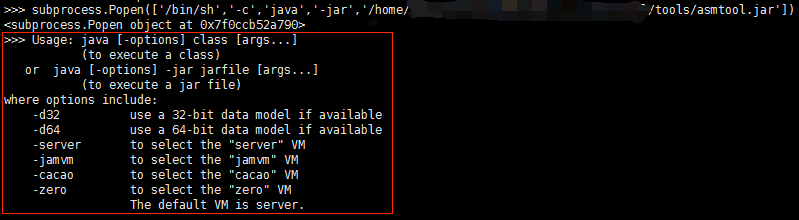
可以看到输出是java的usage输出,也就是说调用java -jar命令失败,换而言之当我们将shell参数设置为true的时候传入的args参数最好是字符串而不是序列,像下面这种形式:
cmd='java -jar /home/example/tools/asmtool.jar'
此时如果shell参数为true且在linux上则最终调用会转换为:
subpsubprocess.Popen(['/bin/sh','-c','java -jar /home/appops/nsmobile/sdk/1.1.1/PackTool/tools/asmtool.jar'])
这种调用很明显就是正确的了。
或者如果定义的是list类型则在传入给Popen前先将其转换为字符串类型
def excuteCmd(cmd):
    if isinstance(cmd,list):
        realcmd = ' '.join(cmd)
    else:
        realcmd = ''+cmd

    print('\n[excuteCmd] Executing: ' + realcmd)

    p = subprocess.Popen(realcmd, shell=True, stdout=subprocess.PIPE, stderr=subprocess.STDOUT)
    output = ""
    for line in p.stdout.readlines():
        output += line
        output += "\n"
    retval = p.wait()
    return retval, output
然后在linux系统上就可以像这样调用了:
cmd = ['java', '-jar','/home/example/tools/asmtool.jar']
ret_code, msg = excuteCmd(cmd)
    if ret_code != 0:
        print msg
        exit(-1)
总结
- Popen的shell参数最好设置为false(这也是默认设置)
- Popen的args参数最好传入序列,如lsit,这也是官方推荐方式
- 如果Popen的shell参数设置为了true,则在linux上args参数最好传递字符串,windows上随意

文章评论