在前面的超级易懂爬虫系列中我们将爬虫的理论知识与实际操作相结合,相信大家都学会了,还没看过的猛戳以下链接
为了让大家能够更加容易明白,这个系列采取了先易后难,逐渐扩充其功能的方式进行讲解,在前面也说到过,在爬取妹纸图的过程中会将妹纸图保存到本地,因为这涉及到I/O操作,相对而言是很费时的一种操作,在前面爬取到某一网页的妹纸图时采取的是一个一个保存的方式,也就是说当爬取到了一个网页的时候需要等到将该网页的所有的妹纸图都保存到本地后才可以爬取下一个网页,而将妹纸图保存到本地相对而言算是耗时操作,因此我们想要是能够在爬取到该网页的妹纸图后能够同时保存n个妹纸图该多好,而不是一个一个的保存,这就是多线程的操作,通过开启多个线程来同时执行n个保存妹纸图的操作,从而提高程序的运行效率。在python中多线程是通过thread/threading模块来完成的,其中threading模块功能比thread模块功能更加高级,使用起来也更容易,因此我们以threading模块为例进行讲解。下面我们先来了解下该模块,然后使用多线程将我们前面的爬取妹纸图的程序进行改写,最后来测试下,采用多线程和不采用多线程程序的执行效率之间的差距。
首先我们来看一下该模块涉及到的重要的类Thread,Timer
- Thread:用来表示一个线程对象,用来创建线程
- Timer:定时器类
我们重点讲解下Thread类,该类是和线程操作相关的核心类
[infobox title="Thread"]
前面说过该类用来表示一个线程对象,用来创建一个线程,通常可以使用两种方式创建该对象,通过传递一个接口,通常是一个函数给其构造函数,然后在该函数中处理线程操作,另外一种是定义一个子类继承Thread,然后重写其run函数(这和java很类似),子类处了run函数和构造函数可以重写外,其余的都不允许重写。No other methods (except for the constructor) should be overridden in a subclass. In other words, only override the __init__() and run() methods of this class.首先我们看下其构造函数,然后对这两种方式一一进行讲解。
threading.Thread(group = None, target = None, name = None, args = () kwars = {})
可以看到该函数的参数都包含默认值,其各个参数意义如下:
- group,该值应该为None,也就是使用其默认值
- target,要调用run函数的回调对象(is the callable object to be invoked by the run() method),也就是前面说的如果采用第一种方式的话,需要传一个函数名给该参数
- name,线程的名字,默认使用Thread-N
- args(),元组参数,用来表示传入target函数的参数
- kwars{},字典参数
下面我们就来看下两种构造线程的方式
- 在构造函数中传入线程运行的回调函数(passing a callable object to the constructor)
#coding:utf-8
import threading

def thread_callback(src):
    print 'now is downloading ',src

count=1
while count<=100:
    threading.Thread(target=thread_callback,args=(count,)).start()
    #threading.Thread(thread_callback(count)).start() 或者直接传入函数,在函数中指定参数
    count+=1
首先通过threading.Thread(target=thread_callback,args=(count,))构造一个Thread,然后链式调用其start函数开启该线程,这和java是类似的,当然还可以直接传入函数,在函数中指定参数,这种方式更直接,即
threading.Thread(thread_callback(count)).start()
- 定义一个类继承Thread,然后重写其run函数
#继承threading.Thread类
class MyThread(threading.Thread):

    def __init__(self,src):
        super(MyThread, self).__init__()  # 必须调用父类的构造函数
        self.src=src

    def run(self):
        print 'now is downloading ', self.src

count=1
while count<=100:
    my_thread=MyThread(count)
    my_thread.start()
    count += 1
注意这种方式如果在继承的类中定义了__init__函数用来接收参数,则必须在该函数中调用
super(MyThread, self).__init__()
否则程序将会出现RuntimeError,这和java中类的继承是一样的,如果子类中显示定义了构造函数,则必须在子类的构造函数中调用父类的构造函数。
但是上面那中方式显然不够灵活,因为那种方式在run函数中指定了具体的执行逻辑,因此只能执行该指定逻辑的任务,而很多时候我们希望能够像第一种方式那样传入一个回调接口,这样我们可以定义不同的函数接口,实现不同的功能。此时我们只需要在我们定义的子类的构造函数中设置一个回调接口参数就可以了。
#继承threading.Thread类
class MyThread(threading.Thread):

    def __init__(self,target,args):  #将回调函数作为其构造函数参数传入
        super(MyThread, self).__init__()  # 必须调用父类的构造函数
        self.target=target
        self.args=args

    def run(self):
        self.target(self.args)

def save_img(src):
    print 'now is downloading ', src
count=1
while count<=100:
    my_thread=MyThread(save_img,count)
    my_thread.start()
    count += 1
我们在定义的子类的构造函数中定义一个target参数作为接收回调函数的参数,args参数作为回调函数接收的参数,然后在run函数中调用该回调函数,这样就可以通过传入不同的回调函数来实现不同的功能。上述两种方式推荐选择第二种,这种方式代码灵活性更高。
了解了基本理论之后下面我们就来将之前的程序改写为使用线程的方式
import os
import urllib2
import re
from bs4 import BeautifulSoup

#将原来的I/O操作放到一个函数saveBeauty中,用来传给Thread类作为回调接口
def saveBeauty(url,count):
    name = 'iyangzi_' + str(count)
    with open(name + '.jpg', 'wb') as img_object:
        img_content = urllib2.urlopen(url).read()
        img_object.write(img_content)
        img_object.flush()

root_url = 'http://iyangzi.com/?p=21'
new_urls = set() #新增加的url集合
crawed_urls = set() #已经爬取的url的集合
count = 1

girl_dir = 'C:\Users\htq\Desktop\girl_'
if not os.path.exists(girl_dir):
    os.mkdir(girl_dir)
os.chdir(girl_dir)

new_urls.add(root_url)#添加待爬取的起始url
start_time=time.time()
while len(new_urls) != 0:
        new_url = new_urls.pop()
        crawed_urls.add(new_url)
        print new_url
        try:
            response = urllib2.urlopen(new_url)
            if response.getcode() == 200:
                soup = BeautifulSoup(response.read(), 'html.parser', from_encoding='utf-8')

                #找到该页指向其它页面的且是新出现的url,添加到new_urls集合中供下一轮爬取
                urls = soup.find_all('a', href=re.compile(r"http://iyangzi.com/\?p=\d+$"))
                for url in urls:
                    #print url['href']
                    if url['href'] not in new_urls and url['href'] not in crawed_urls:
                        new_urls.add(url['href'])

                all_img = soup.find('div', class_='post-content').find_all('img')

                for img in all_img:
                    src = img['src']
                    # print src
                    threading.Thread(saveBeauty(src, count)).start()
                    #将原来的I/O操作放到一个函数saveBeauty中,然后作为回调接口传给Thread作为参数
                    '''
                    name = 'iyangzi_' + str(count)
                    with open(name + '.jpg', 'ab') as img_object:
                        img_content = urllib2.urlopen(src).read()
                        img_object.write(img_content)
                        img_object.flush()
                    '''
                    count += 1

        except urllib2.URLError, e:
            print e
end_time=time.time()
#打印出程序运行时长
print 'total time is',end_time-start_time
程序代码注释很详细,相信大家都看得懂,主要就是把原来的保存妹纸图的I/O操作放到一个单独的函数中,然后将其传给Thread类作为参数,这样每一个保存妹纸图的操作就是一个单独的线程操作。
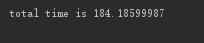
然后测试一下使用多线程和不使用多线程的运行效率各是多少。首先运行我们在超级易懂爬虫系列之爬取全部妹子图中讲解的程序,这个是没使用多线程的,测试结果如下:
然后运行上面的使用多线程的程序,测试结果如下:
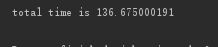
可以看到使用多线程明显效率提高了不少,如果I/O操作越密集,这种优势会越明显。
注:本文首次发表于huqi.tech,谢绝转载,如需转载,请注明出处:huqi.tech

文章评论